

 Română
 English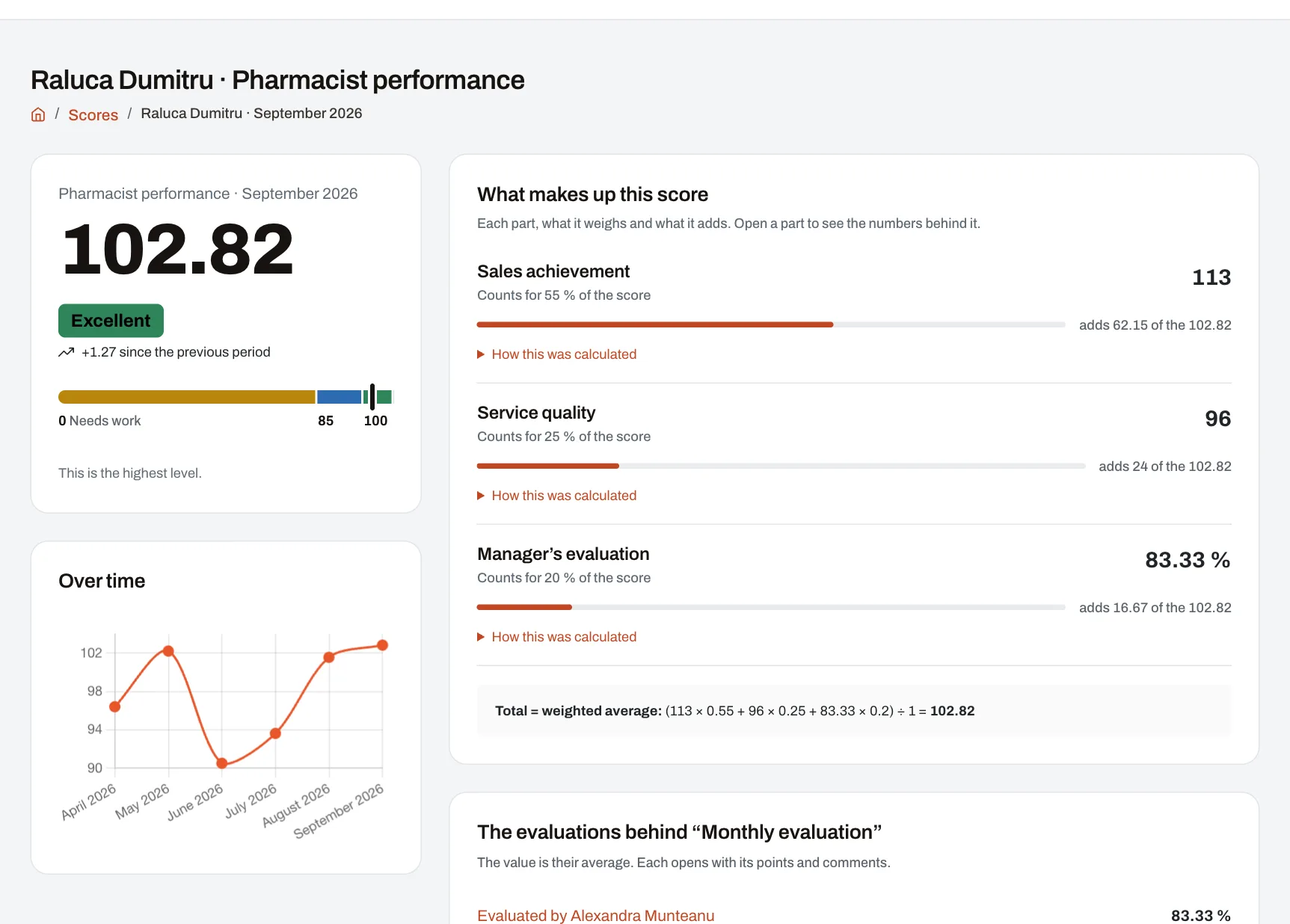
The Performance module turns the numbers your company already tracks — sales, quality, training, audit results, managers’ evaluations — into a score on levels for every employee, work unit, department or area. It suits companies with several locations: HR sets the rules once, each manager sees their own people and units, and every employee sees their score and what it is made of without having to ask.
From a number to a score
- HR chooses the metrics. A metric is a number tracked for a person or a unit, per day, week, month, quarter or year. Result: the list of metrics, each with its source.
- The numbers come in. Managers enter them for the people they manage, with last period’s value alongside; HR imports a file; some are collected from the other modules by themselves. Result: the period’s values, and whatever is missing stays “no data”.
- HR picks or builds a scorecard. The scorecard says what parts the score has, how much each counts and what the levels are, and is then applied to everyone, a role, a team, a unit, a department, an area or one person. Result: a published, assigned scorecard.
- HR closes the period once it has ended. Result: scores are calculated at once for everyone the scorecard applies to and kept; each employee with a login who received a score gets a notification.
- People and managers read the scores. Result: for every score you see the level, what counted and how much, the numbers used and the trend over time.
The screenshot above is a score page from the demo company: on the left, the month’s score with the level reached, the change since the previous month, the level ruler and a chart of recent months; on the right, each part of the score with its share of the total and the points it adds, how the total was worked out, and the manager’s evaluations behind one of the parts.
A worked example
An example with invented numbers. A monthly scorecard for sales consultants has three parts and the default total — the weighted average. The levels are the standard ones: “Needs improvement” from 0, “Satisfactory” from 60, “Good” from 80, “Excellent” from 95.
| Part | How it is scored | Importance | The month’s numbers | Part score |
|---|---|---|---|---|
| Sales achievement | Achieved compared with planned (%) | 50 | 36,800 achieved of 40,000 planned | 92 |
| Service quality | The number as it is | 30 | a mark of 86 | 86 |
| Training completed | The number as it is | 20 | no data | — |
Training has no data, so it stays out of the average: (92 × 50 + 86 × 30) ÷ (50 + 30) = 7,180 ÷ 80 = 89.75. The score is “Good”, 5.25 points short of “Excellent”. On the score page, sales shows as 62.5% of the score (adding 57.5 points), quality as 37.5% (adding 32.25), and training as “no data — left out”.
Had training been 70, the score would have been (92 × 50 + 86 × 30 + 70 × 20) ÷ 100 = 85.8. Had the missing value been taken as 0, the score would have dropped to 71.8 — “Satisfactory” — because of a number nobody reported, not a weak result. The score is kept to four decimals and shown with at most two; the level is the highest threshold reached.
When data is missing
- A missing value stays “no data”, not 0. Harmoniq never fills it in by itself.
- With the weighted average, a part with no data is left out and the others take over its weight. If no part has data, the person has no score for that period.
- With the other totals (the sum of the parts, the weakest or the best part), a part with no data leaves the whole total without data — except for parts where you ticked “No data counts as 0 in the total”.
Versions and corrections
- A published scorecard no longer changes. A change goes into a new version; the old version is kept, because past scores were calculated with it, and it can be brought back into use.
- Every result keeps the version of the formula used and the exact numbers it was calculated from, shown under “How this was calculated”.
- A mistake is fixed at the source — the value entered again, the file re-imported — and the period is then closed again. The new scores replace the old ones, and the earlier close stays in the list, marked “Replaced”.
The KPI score and a manager’s evaluation
The KPI score is calculated from numbers. An evaluation is the manager’s judgement, filled in on the company’s own forms: criteria with points, comments, a deadline. The two connect: each form becomes a metric — the average of the evaluations submitted in the period — which you can add to a scorecard as one part of the score, with the importance you choose. With no evaluation submitted, the part is “no data”.
Where the numbers come from
- Entered by hand by whoever holds “Evaluate employees”, only for the people and units they manage; nobody enters their own values.
- Imported from Excel (.xlsx) or CSV with a saved column profile. The file is checked first: if any row has a mistake, nothing is written and the row is shown.
- Collected by Harmoniq from the modules you have, once you switch them on: headcount, hires and leavers, absences, training completed and overdue, documents up to date, audits, kudos, CRM results. They are collected every night for the last period that ended.
- From managers’ evaluations and from the period’s objectives.
- Sent through the API by the company’s own systems (Enterprise) — see integrations.
Who sees what
- The employee (“View own scores”, given to every employee by default): only their own scores, and only the parts the scorecard shows to the person scored.
- The unit or area manager (“View team scores”, by default for both roles): the scores of the people, units and areas they manage, with every part, the average score, how many improved and how many declined, and how the group is spread over the levels.
- Whoever closes periods (“Close periods and run calculations”, by default the Owner and the HR Administrator): every score.
Limits and conditions
- Plan: Performance is included in Starter, Professional and Enterprise, not in the free plan. On Starter you start from five ready-made scorecards, published as they are. Building your own scorecards, formulas, the dry run and objectives come with Professional and Enterprise; the API with Enterprise. Details on the pricing page.
- Setup: a score appears only once there are metrics with values, a published and assigned scorecard, and a closed period. A period is closed by hand, and only after it has ended.
- Dependencies: numbers collected automatically come only from modules in your plan — training from Learning, audits from Audit, results from the CRM.
- What it does not do: Harmoniq does not run payroll. The bonus set in a scorecard is shown next to the score; paying it stays in your payroll system.
Frequently asked questions
What happens if an employee has no data for one part of the score?
The part shows “no data” and, with the weighted average, is not counted: the other parts take over its weight, and the score does not drop because of a number nobody reported. If for you missing means 0, the scorecard has to say so: with “No data counts as 0 in the total” on the sum, weakest-part or best-part totals, or with the part’s own formula (Professional and Enterprise).
Can a manager enter their own numbers?
No. Values are entered only for the people and units someone manages, never for themselves, because those values feed their own score and possibly their bonus.
What happens to past scores when we change the scorecard?
They stay exactly as they were calculated. The change goes into a new version of the scorecard, and every result keeps the formula version and the numbers it used.
We found a wrong number after the month was closed. How do we fix it?
Correct the value and close the month again. Scores are recalculated for everyone on the scorecard, and the earlier run stays visible, marked “Replaced”.
Can employees see how their score was calculated?
Yes: the level, each part’s share of the score, the points it adds and the numbers it came from. Parts the company marks as hidden do not show for the person scored, but their managers see them.