

 Română
 English
This guide is for managers, HR specialists and business owners who have to decide what gets measured for a role: a sales representative, a receptionist, a store coordinator, a call centre operator. By the end you will have a scorecard with 3–5 indicators, each with a definition, a source, a target and a weight, tested on past months before it counts for anyone.
Choosing indicators is a management decision, not a legal obligation. If the score affects pay or a bonus, however, the rules must be set in advance and written into the company’s documents (employment contract, internal regulations or collective agreement). Check the wording with the company’s lawyer.
Four terms, explained once
- The objective says, in words, what the company wants from the role: “customers in the area buy steadily and pay on time”.
- The indicator (KPI) is a figure that shows how close you are to the objective: “collections on time, as a percentage of invoices due”. It has a definition, a unit of measure and a source.
- The target is the value you consider “on track” for the period: “90%”. The target may change from one period to the next; the indicator stays the same.
- The score is the result calculated from the indicators: each value is compared with its target, and the results are combined by weight. The score is read on levels (for example “Below expectations”, “Meets expectations”).
Step 1. Start from what the role is for
Who: the direct manager, with someone from HR. Inputs: the job description and a conversation with two or three people who do the work. Result: the two or three outcomes the role exists for.
Ask: what would go wrong if the position stayed empty for a month? For a field sales representative, the answer is sales and collections; for a receptionist, arrivals without waiting and rooms billed correctly; for a stock keeper, accurate stock. That is where the first indicators come from. Activities (“sent 40 emails”) are rarely good indicators: they show effort, not results.
Step 2. Keep only what the person can influence
A good indicator moves when the person works better. If the figure depends mainly on others — centrally set prices, a national campaign, the weather —, the score will punish or reward luck. For each candidate, ask: “What can the person do tomorrow to change the figure?”. If the answer is “nothing”, the indicator belongs to the team or the manager, not the individual.
Step 3. Balance volume with quality
A volume indicator on its own encourages haste: sales that come back as returns, calls closed too quickly, rooms handed over unprepared. Put a quality indicator next to it: justified complaints, returns, an audit result, collection on time. The rule of thumb: every volume indicator has a “partner” that would drop if the volume were achieved badly. The same idea is behind Kaplan and Norton’s balanced scorecard: no single measure shows the whole result (Harvard Business Review, 1992).
Step 4. Write the indicator sheet
Who: the manager, with whoever owns the data (sales, accounting, HR). Result: one row per indicator, filled in completely. If a column cannot be filled in, the indicator is not ready yet.
Three to five indicators per role are enough. Beyond that, the weights become small and nobody knows any more what really matters.
Full example: field sales representative
Example with fictitious data. A distribution company sells to shops; the representative has a portfolio of customers and a monthly plan.
| Indicator | Definition | Unit | Source and frequency | Target | Direction | Who enters the data | Weight |
|---|---|---|---|---|---|---|---|
| Sales achievement | Net sales invoiced in the month, excluding returns, compared with the representative’s monthly plan | % of plan | Invoicing software, monthly | 100% (cap 120%) | Higher is better | The sales analyst (import) | 40% |
| Collection on time | Invoices collected by their due date, out of all invoices due in the month | % | Accounting, monthly | 90% | Higher is better | The chief accountant | 25% |
| Visits completed | Visits to active customers, compared with planned visits | % of plan | Visit report, monthly | 100% (cap 100%) | Higher is better | The area manager | 20% |
| Justified complaints | Customer complaints confirmed as the representative’s fault | number | Complaints register, monthly | at most 2 | Lower is better | The quality officer | 15% |
The weights add up to 100%. Nobody enters their own values.
Why we do not simply add up the figures
The values are in different units: lei, percentages, number of visits, number of complaints. 138,000 lei and 1 complaint cannot be added together. First each value is normalised, that is, turned into a “percentage of target” on the same scale: 100 means “exactly on target”. Only then are they combined by weight. That order — normalise, then weight, then aggregate — is the one the OECD and the European Commission’s Joint Research Centre describe for composite indicators (Handbook on Constructing Composite Indicators, 2008).
- For “higher is better”: achieved ÷ target × 100.
- For “lower is better”: 100 up to the limit; above it, limit ÷ achieved × 100 (2 complaints allowed: 0 or 1 → 100, 3 → 66.67, 4 → 50).
- Capping limits the result of a part, for example to 120. Without a cap, a single exceptional month on one indicator can hide a real problem on another.
The calculation for one month
| Indicator | Value for the month | Normalisation | After the cap | Weight | Contribution |
|---|---|---|---|---|---|
| Sales achievement | 138,000 lei out of a 120,000 lei plan | 138,000 ÷ 120,000 × 100 = 115 | 115 | 40% | 46.00 |
| Collection on time | 85.5% | 85.5 ÷ 90 × 100 = 95 | 95 | 25% | 23.75 |
| Visits completed | 52 out of 60 | 52 ÷ 60 × 100 = 86.67 | 86.67 | 20% | 17.33 |
| Justified complaints | 1 | 1 ≤ 2, within the limit → 100 | 100 | 15% | 15.00 |
| Score | 100% | 102.08 |
With the levels 0 “Below expectations”, 70 “Partially meets”, 90 “Meets expectations” and 110 “Exceeds expectations”, 102.08 means “Meets expectations”, almost 8 points short of the next level. Had complaints been scored as target ÷ achieved, with no limit, the same month would have given 117.08 — “Exceeds expectations” —, almost entirely because there was one complaint instead of two.
Step 5. Decide what happens when data is missing
“Missing” and “zero” are not the same thing. Zero sales means the person worked and did not sell; a missing value means the report did not arrive, the person was on leave or the indicator does not apply. If a missing value automatically becomes 0, the score punishes the person for a data problem.
For each indicator, write the rule down in advance:
- Leave the part out and redistribute its weight among the others. In the example above, without the visit report, the score would be (46 + 23.75 + 18) ÷ 0.80 = 109.69.
- Count the missing value as 0 only when missing truly means “not done” (for example, the visit report is the representative’s responsibility). The score would be 87.75.
The difference between 109.69 and 87.75 shows why the rule must be chosen beforehand, not after you see the result.
A zero target and unusual periods
- A zero target (“zero accidents”, “zero stock shortages”) cannot be used as a denominator: division by zero has no result. Use “reached / not reached” (100 or 0) or points by steps (0 deviations = 100, 1 = 50, more = 0).
- An incomplete month (hired mid-month, long leave, a unit closed for renovation) is handled by adjusting the target in proportion to the days worked, or by “no data”. Do not fill in zero to “close” the month.
- An exceptional period for the whole team (a distribution network stopped for a week) is noted and discussed; do not change the formula after you have seen the results.
Step 6. Test the scorecard on past months
Who: HR and the manager. Inputs: the values from the last 3–6 months. Result: a scorecard you have seen working before it counts.
- Calculate the scores for past months, without sharing them.
- Check the distribution: if everyone comes out “Exceeds expectations” or everyone “Below expectations”, the targets or the levels are wrong.
- Look for odd cases: a good performer with a low score, a month with many parts without data, an indicator that always hits the cap.
- Adjust, then share the scorecard with people before the first month that counts, with a worked example like the one above.
- Review after three months of real use: which indicators did not move, what data was missing, what questions people asked.
Common mistakes
- Too many indicators. With ten indicators at 10% each, nobody knows what matters. Fix: keep 3–5 and follow the rest as information, without weight.
- Values added up in different units. Lei plus percentages give a meaningless figure. Fix: normalise each value against its target.
- “Lower is better” as target ÷ achieved, with no limit. One complaint instead of two doubles the part’s result, and zero complaints cannot be calculated at all. Fix: give 100 up to the limit — that is how “Lower is better” scores — or use steps.
- Missing data counted as zero by default. Fix: decide the rule for each indicator and write it on the scorecard.
- Indicators the person does not control. Fix: move them to the team or manager level.
- The formula changed after the month was closed. Fix: changes go into a new version, for the following periods. More in the guide on scores people trust.
How to apply the steps in Harmoniq
The scorecard above is built in scorecards, in four steps: basic details, what you measure, levels and bonuses, review. For each part, choose from the list how it is scored — “Achieved compared with planned (%)”, “Compared with a fixed target (%)”, “Lower is better”, “Reached or not reached”, “Points by steps” — and under “More options” set the cap (“Never above”).
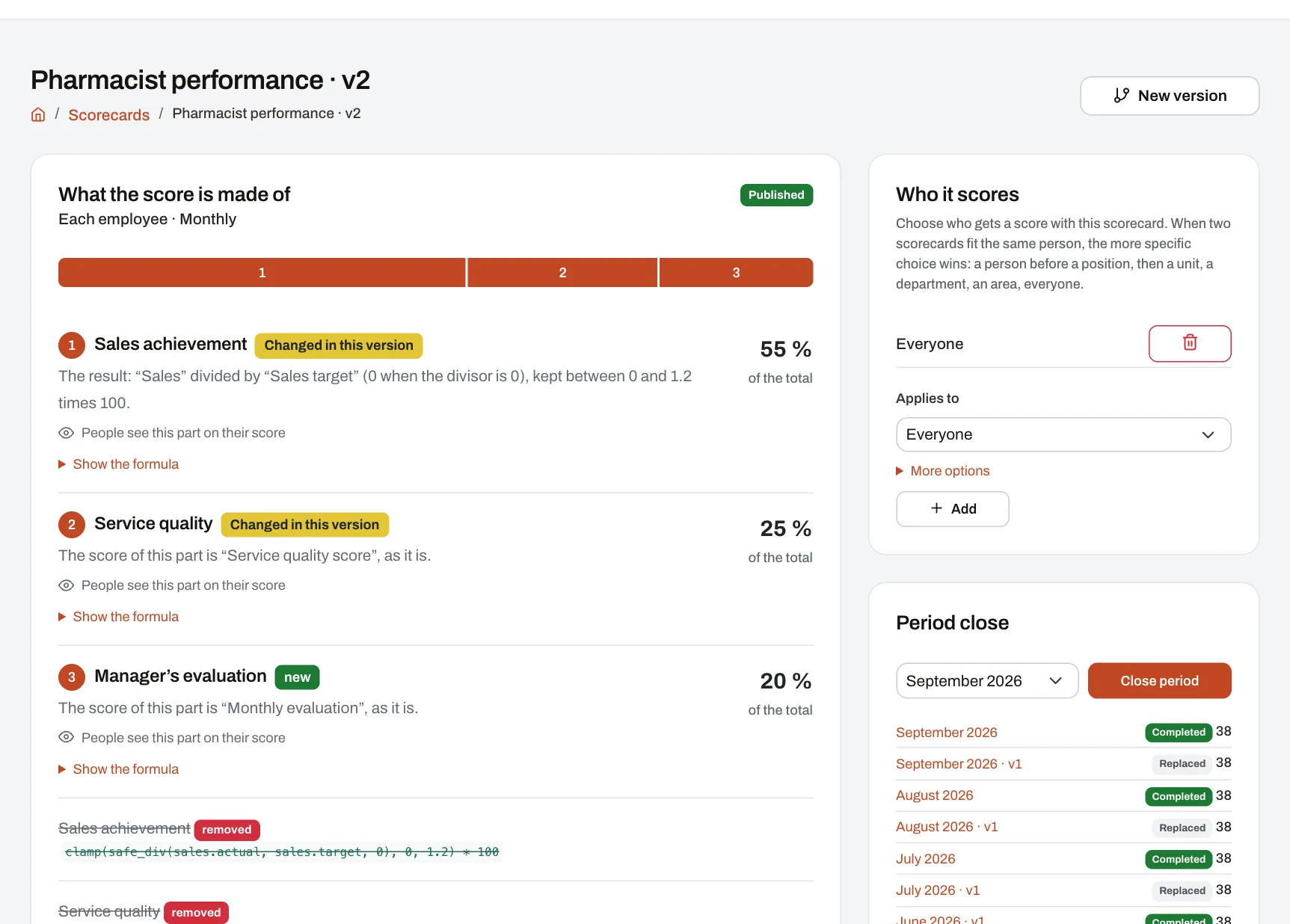
- Weights are entered in the “Importance” field, as any numbers (40, 25, 20, 15 or 4, 2.5, 2, 1.5): Harmoniq relates them to their sum and shows each part’s percentage.
- Missing data stays “no data”, never 0. In the weighted total, a part without data is left out and the others take over its weight — the first option above. If in your case a missing value must count as 0, say so explicitly with the “If missing, use 0” piece in a formula of your own.
- Division by zero does not stop the calculation: the result is “no data”. “Lower is better” is the exception: up to the limit, zero included (zero complaints), the score is 100, so an indicator that can be zero is scored correctly with it too.
- Testing on past months is done with “Dry run”, on the scorecard’s page: choose a closed period and see how the scores would be spread across the levels, without anything being saved.
- Values are entered by hand by whoever has the right to (with last month’s value alongside), imported from Excel or CSV with a check before anything is written, or come from other modules: training, audits, evaluations and objectives.
Building your own scorecards and the dry run are included in the Professional and Enterprise plans; on Starter you start from the ready-made scorecards.
Frequently asked questions
How many indicators should I set for a new role with no history?
Two or three, with provisional targets, using the first three months for information only. Fix the targets and weights only after you see the real values.
Can I use the same set of indicators for all roles?
Only for the common indicators (for example, mandatory training completed on time). The main result differs from one role to another, so each role needs its own specific part. A scorecard can be applied to the whole company, a role, a unit, a department or a person; the more specific choice takes precedence.
What do I do if a target turns out to be unrealistic halfway through the year?
Change the target for the periods that follow and tell people why. Do not recalculate months already shared unless you have found a data error, and then explain the correction.
Do team indicators belong on an individual scorecard?
Yes, with a small weight (10–20%), when you want to encourage collaboration. If the team’s weight is large, the individual score no longer says much about the person.
Next step
Write the scorecard for a single role, test it on past months and only then extend it. If you want to see what a complete scorecard and the resulting scores look like, enter the demo company as the HR manager.