

 Română
 English
This guide is for managers and HR specialists who share performance scores and get the question “why did I get this score?”. It does not go back over choosing the indicators (the guide on how to choose KPIs covers that); it shows how to make a score that can be checked: the person can redo the calculation themselves, knows what happened to missing data and knows what they can do if a figure is wrong.
People accept a low score more easily than one they do not understand. Trust does not come from the figure, but from being able to follow the path that led to it.
What the person must be able to see
For every score, the person being assessed should be able to find, without asking for a file:
- the parts of the score and the share of the total each one represents;
- the value of each part and the figures it was calculated from;
- the calculation rule for each part, said in words;
- the total, with the operation that produces it;
- the level reached and the distance to the next level;
- what happened to missing data;
- the version of the rules it was calculated with.
If any of these is missing, the conversation about the score becomes a conversation about trust.
Example: “why did I get 106.15?”
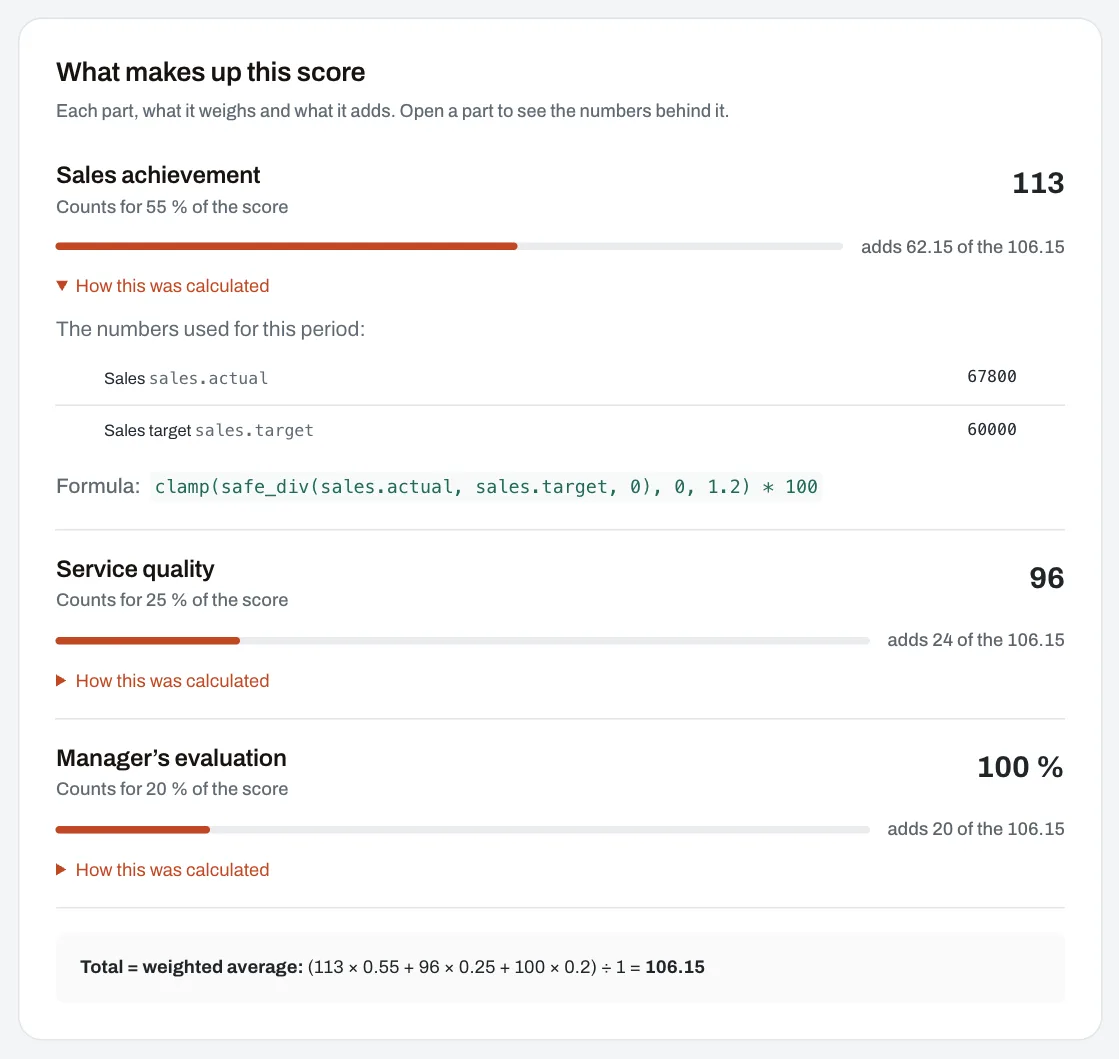
Example from the Harmoniq demo company, with fictitious data. A pharmacist’s scorecard has three parts. Last month, one of the employees got 106.15. The full explanation looks like this:
| Part | Figures used | Rule | Value | Share | Points added |
|---|---|---|---|---|---|
| Sales achievement | 67,800 lei achieved, 60,000 lei target | achieved ÷ target × 100, kept between 0 and 120 | 113 | 55% | 113 × 0.55 = 62.15 |
| Service quality | the month’s quality score: 96 | the figure as it is | 96 | 25% | 96 × 0.25 = 24.00 |
| Manager’s evaluation | the monthly evaluation: 100% of the grid’s points | the figure as it is | 100 | 20% | 100 × 0.20 = 20.00 |
| Total | the weighted average | 100% | 106.15 |
With the scorecard’s levels (0 “Needs work”, 85 “Good”, 100 “Excellent”), 106.15 is “Excellent”. Every figure in the table can be checked: 67,800 ÷ 60,000 = 1.13; 62.15 + 24 + 20 = 106.15. The cap of 120 did not come into play, because 113 is below it.
The same score, without the evaluation
If the manager’s evaluation had not been filled in, the part would be “no data”. Two options, with very different results:
- The missing part is left out, and the other two share its weight: (62.15 + 24) ÷ 0.80 = 107.69.
- The missing part counts as 0: 62.15 + 24 + 0 = 86.15 — one level lower, for an evaluation the employee had no way of filling in.
The second option punishes the person for someone else’s delay. If you choose it, do so deliberately (for example, when the part really is the person’s own responsibility) and say so in advance.
Missing data is not zero performance
Zero sales in a month worked is information about performance. Zero sales because the person was on leave or the report was not uploaded is a data problem. A trustworthy score keeps them apart:
- it shows “no data” where there is no figure, not 0;
- it says how the missing value was handled in the total;
- it does not compare a person whose score was calculated from three parts with one calculated from a single part without saying so.
The rules do not change along the way
A formula changed after the period has closed damages trust in every score, not just the one that changed. The safe practice:
- a published scorecard is no longer edited; any change becomes a new version, for the following periods;
- each result keeps the version it was calculated with and the figures used;
- people learn about the change before the period it applies to, with a worked example.
Corrections are allowed, but they are visible
A score can be wrong because a figure was wrong. Refusing any correction does not build trust; correcting without a trace destroys it. The good rule is an explicit correction: the value is corrected, the period is recalculated, and the person learns what changed and why.
The limits of comparisons
- Between roles: 95 for a sales representative and 95 for an accountant do not mean the same thing, because the scorecards are different. Compare the levels, not the figures.
- Between versions: a score calculated on version 1 and one on version 2 may have different parts and weights. Say so when you show the trend.
- Between periods: a month with a part without data is not compared directly with a complete one.
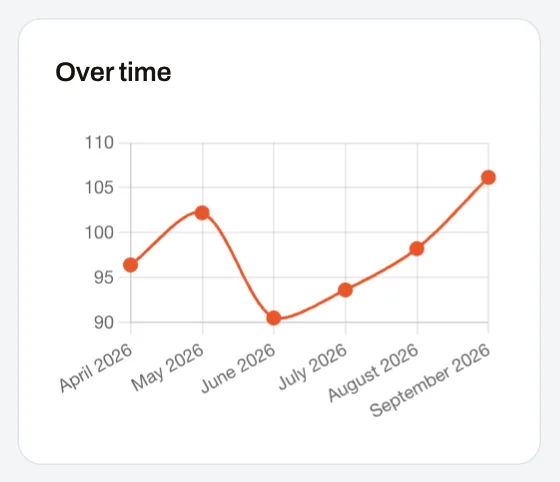
- The trend says more than a single month: three periods in a row going down are a good reason for a conversation, not for a sanction.
The conversation about the score: a model
A 15-minute conversation between the manager and the person, after each period is closed:
- The figure and the level (1 minute): “Your score for September is 106.15, the ‘Excellent’ level.”
- What counted (3 minutes): go through the parts, the largest contribution and the smallest.
- Checking the data (3 minutes): “Do you recognise the figures? Is anything missing?” If the person disputes a figure, note it and check it; do not debate it on the spot.
- The trend (3 minutes): what changed compared with past months and why.
- One step for next month (5 minutes): just one, linked to the part with the most room for improvement.
Template for a data check request
When someone thinks a figure is wrong, the request should be short and specific. A template you can copy into the team’s rules:
Period: September 2026. Part: Sales achievement. Figure shown: 67,800 lei. Figure I consider correct: 71,200 lei. Reason: invoice no. … of 29 September does not appear in the report. Document: attached or referenced.
Decide in advance who receives the request (usually whoever owns the data source, not the manager doing the assessment), how quickly they reply (for example, within 5 working days) and what happens if the figure turns out to be wrong (correction and recalculation, with the person informed).
Common mistakes
- The score sent without an explanation. Fix: every score comes with its parts and the figures used.
- Missing data silently counted as 0. Fix: show “no data” and say how it was handled.
- Weights changed retroactively. Fix: a new version, from the next period.
- Corrections without a trace. Fix: a correction is announced and explained.
- Whoever enters the data enters their own values. Fix: nobody judges their own record.
- A public ranking across different roles. Fix: compare within the same scorecard.
How to apply the steps in Harmoniq
In Performance and KPI, each employee sees their score on its levels, the change since the previous period, the trend over time and, under “What makes up this score”, each part with its share and the points it adds. “How this was calculated” shows the figures used and the formula.
- Missing data appears as “no data — left out”, and in the weighted total the other parts take its place. A part goes to 0 only if whoever builds the scorecard chooses that explicitly.
- Versions: a published scorecard is frozen; a change becomes the next version, and each result keeps the formula version and the figures used.
- Corrections: a corrected value replaces the old value, but scores already calculated do not change by themselves. They change when someone with the right to close periods (by default the Owner and HR Administrator roles) closes the period again. The new close uses the version published at that moment and replaces the results; the old ones remain, marked “A later close of this period replaced this result”. Tell people when you do this and why.
- Who sees and who enters: employees see their own scores (without the parts marked as hidden from them); managers see the people in their reach. Values are entered by whoever has the right to, only for the people in their reach and never for themselves.
- Data checks have no dedicated flow in the application: use the template above on the channel agreed in your company. For managers’ evaluations, the employee confirms they have read the evaluation and can reply once.
Frequently asked questions
Do I have to show each employee the formula?
Not the technical formula, but the rule in words and the figures used. Whoever wants the detail can find it; whoever does not reads the level and the parts.
What do I do if I find a mistake after I have shared the scores?
Correct the value, recalculate the period and inform the people affected, with the old figure, the new figure and the reason. An explained correction increases trust; a hidden one reduces it.
Can I change the weights halfway through the year?
Yes, for the following periods, through a new version shared in advance. Months already closed stay calculated on their own version; if you close them again, they are recalculated on the version in force, so avoid that without a clear reason.
Does a ranking help or hurt?
Among people with the same scorecard, it can be useful to the manager. Shown publicly, it turns the score into a competition and moves the conversation from “what can I improve” to “who is first”.
Next step
Take a real score from last month and try to explain it in five minutes with the table above. Wherever you cannot, that is where transparency is missing. To see a score explained on screen, enter the demo company as an employee.