

 Română
 English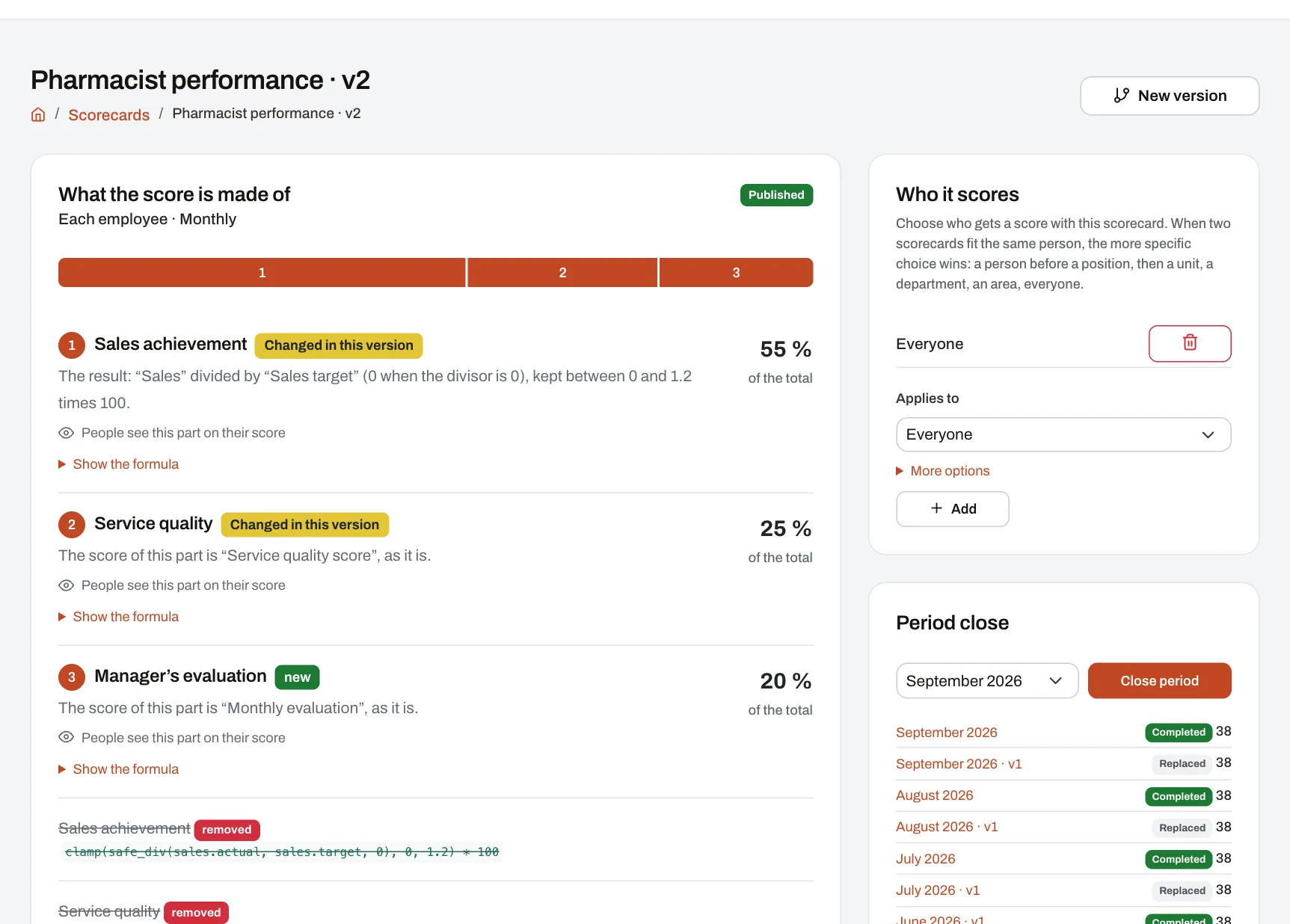
A scorecard says what a score is made of: its parts, how each is scored, how much each counts and what the levels are. In Harmoniq you build one in a four-step wizard, choosing from lists, without writing formulas. For those who want full control, any part or the total can have its own formula, checked as you type. A scorecard is tried on real data before it is published, and does not change after that.
From draft to scores
- Basics (HR). The scorecard’s name, who gets a score — each employee, work unit, department, area or the company — and how often: daily, weekly, monthly, quarterly or yearly. Result: a draft, which calculates nothing for anyone.
- What you measure (HR). Add the parts of the score. For each, choose the metric, how it is scored and its importance; optionally, a target shown to people, “Never below” and “Never above” limits, and whether the person scored sees that part. This is also where you choose how the total is worked out. Result: under each choice a sentence says what it does, and the “Try it” panel shows what comes out for a real person in a past period.
- Levels and bonuses (HR). Start from four standard levels and change the names, thresholds and colours; optionally, a bonus per level or per score range. Result: the scale, as people will see it.
- Check and save (HR). Result: the scorecard in plain words, with each part’s share.
- Dry run (HR). On a period that has already ended, see how many would get a score and how many would not, the lowest, median and highest score, the spread, how many would reach each level, the total of bonuses and how many parts have no data. Nothing is saved.
- Publish and assign (HR). Publishing freezes the scorecard. Then choose who it applies to: everyone, a role, a team, a work unit, a department, an area or one person. Result: at the next period close, each person gets their score from the scorecard that fits them.
The screenshot above is the page of a published scorecard in the demo company, at its second version: each part with its share of the total and how it is scored, said in words, with what changed since the previous version; on the right, who the scorecard applies to and the period closes, where the old version’s runs show as “Replaced”.
How a part can be scored
| Choice | What it does |
|---|---|
| Use the number as it is | The part’s score is the metric’s value itself — a quality mark, for example. |
| Achieved compared with planned (%) | Achieved divided by planned, as a percentage: hitting the plan exactly gives 100. |
| Compared with a fixed target (%) | The value divided by one target that is the same for everyone, as a percentage. |
| Lower is better | Up to the chosen limit, zero included, the score is 100; at twice the limit, 50 — for response times, shrinkage, absences. |
| Reached or not reached | 100 when the value reaches the threshold, otherwise 0. |
| Points by steps | The points of the highest step reached; below the first step, no points. |
The total is chosen the same way: by how much each part counts (the weighted average — a part with no data is left out), the sum of the parts, the weakest part or the best part. With the last three, a part with no data leaves the total without data, except for parts where you tick “No data counts as 0 in the total”.
An example scorecard
An example with invented numbers: a monthly scorecard for the sales consultants of a store chain, with the standard levels (“Needs improvement” from 0, “Satisfactory” from 60, “Good” from 80, “Excellent” from 95).
| Part | How it is scored | Importance | One person’s numbers | Part score |
|---|---|---|---|---|
| Sales achievement | Achieved compared with planned, never above 120 | 50 | 36,800 of 40,000 | 92 |
| Service quality | The number as it is | 30 | 86 | 86 |
| Complaint response time | Lower is better, limit 4 hours | 20 | 5 hours | 80 |
For the same person, the kind of total changes the result:
| Total | Every part has data | No data for response time |
|---|---|---|
| By importance | (92 × 50 + 86 × 30 + 80 × 20) ÷ 100 = 87.8 — “Good” | (92 × 50 + 86 × 30) ÷ 80 = 89.75 — “Good” |
| The weakest part | 80 — “Good” | no score; with “counts as 0” ticked: 0 |
| The best part | 92 — “Good” | no score; with “counts as 0” ticked: 92 |
The sum of the parts makes sense when the parts are points (points by steps, for example), not percentages.
For those who want more
- Your own formula, for a part, the total or the bonus: functions from a closed list (minimum, maximum, limits, rounding, division that never fails on zero, thresholds, the previous period, year to date, the average of colleagues in the unit, the place in the ranking). The formula is checked as you type and said back in plain words underneath; ready-made pieces such as “If missing, use 0” or “Points by thresholds” are added with one click. A formula cannot run code.
- Versions: a published scorecard is not edited; “New version” starts a draft from it, and the scorecard’s page shows which parts changed, which are new and which were removed. An old version can be brought back into use.
- The AI assistant, if the company has switched it on, drafts a formula from a plain description; the draft is checked like any other before it is saved.
Limits and conditions
- Plan: the four-step wizard, your own formulas, the “Try it” panel, the dry run and new versions come with Professional and Enterprise. On Starter you start from five ready-made scorecards (Generic employee, Sales representative, Retail store manager, Customer support agent, Store scorecard), which you check, publish as they are, assign and close periods with. The free plan does not include the Performance module. See pricing.
- Permissions: “Author formulas and scorecards” to build, publish and assign scorecards; “Manage metrics” for metrics and imports; “Close periods and run calculations” to calculate scores. By default the Owner and the HR Administrator hold them; roles can be adjusted.
- Sizes: up to 20 parts, 10 levels and 20 bonus rules per scorecard.
- Dependencies: a scorecard needs metrics with values — entered, imported or collected from modules (see Performance and KPI). The dry run and “Try it” work only on past periods, with the data already there.
Frequently asked questions
Do we need to know how to write formulas?
No. Each part is scored by picking one of six choices, and the total from four. Harmoniq writes the formula for you; you only see it if you ask, with “Show the formulas”.
Can we try a scorecard before applying it to people?
Yes. While it is a draft, it calculates nothing for anyone. “Try it” shows a part’s result for one person in a past period, and the dry run shows how everyone would spread over the levels, without saving anything.
What if two scorecards fit the same person?
The person gets one scorecard: the one with the higher priority, if you set one; otherwise the most specific — the person, then the role, the team, the work unit, the department, the area and, last, everyone.
Can we change a scorecard after closing months with it?
Not directly: create a new version, try it and publish it. Scores already calculated stay on their version; if you close a past month again, it is recalculated with the published version, and the old run stays marked “Replaced”.
What do we get on Starter?
Five ready-made scorecards that you publish, assign and close periods with, plus the page of every score. To change a scorecard’s parts, weights or levels you need Professional or Enterprise.