

 Română
 English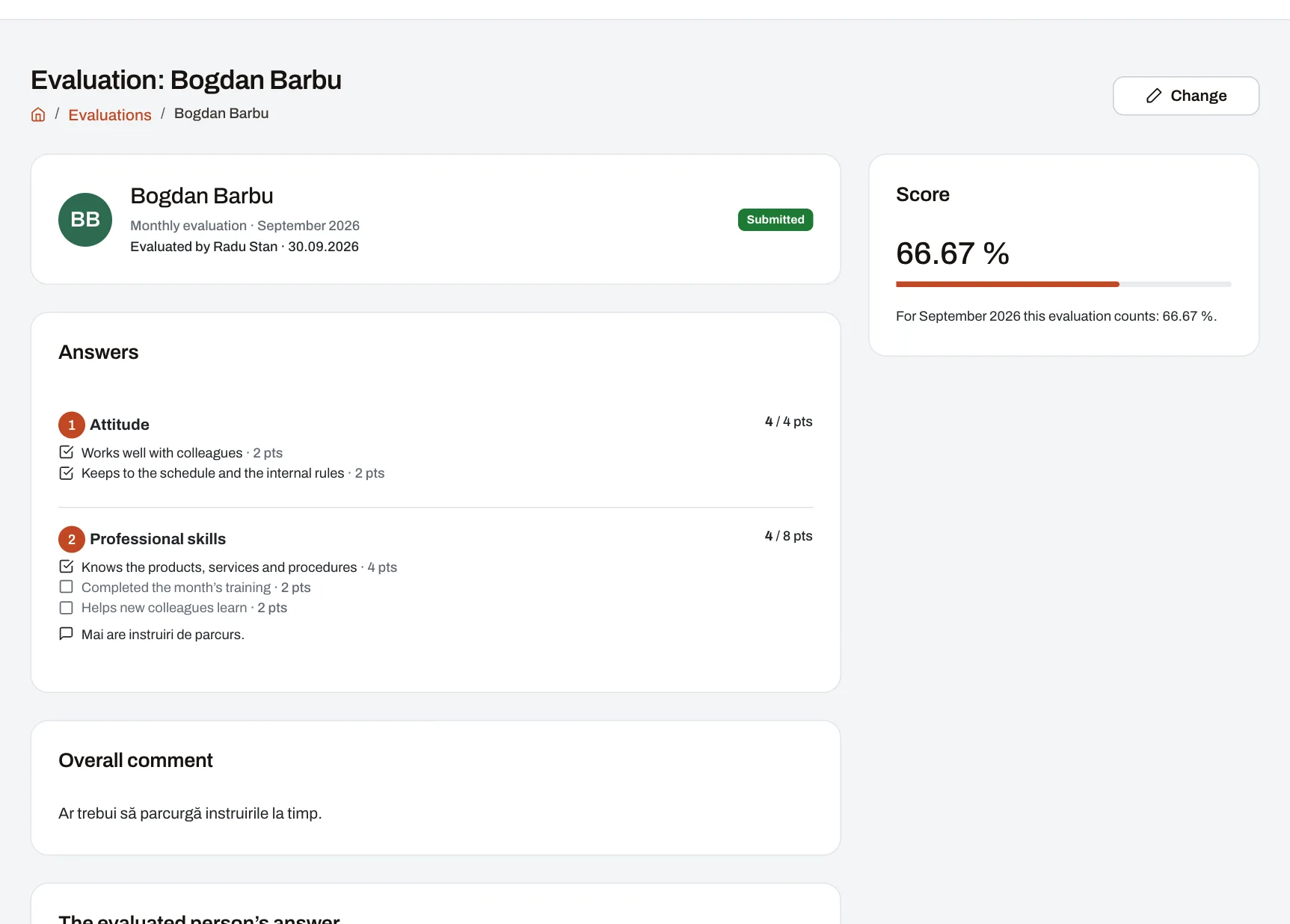
With Evaluations, managers evaluate their people on forms your company makes: criteria with points, comments and a deadline. The forms cover what the numbers don’t show — attitude, know-how, the way someone works with colleagues. Harmoniq works out the points from the form, and the average of a person’s evaluations in a period becomes a metric you can put into the KPI score, next to sales, audits or training.
How it works
- HR builds the form. Start from one of three ready-made forms or from scratch, and choose the criteria and points, how often people are evaluated (monthly or quarterly), whether the result is in points or as a percentage of the maximum, the deadline, and who is evaluated: all employees or chosen people, roles, units, departments or areas. The result: a draft that managers don’t see yet.
- HR publishes the form. The result: managers find it under Evaluations, and the form now has its own metric. From here on it changes only through a new version.
- The manager sees their list. For every open period they see who is left to evaluate, what they have started, what they have sent and how long they have. If anyone is still left in the last three days before the deadline, they get one reminder.
- The manager fills in the evaluation. For each criterion they tick, pick a level or give a mark, with an optional comment, plus an overall comment; the total shows as they answer. They can save and continue later. The result: on sending, the points are worked out from the form, and the person gets a notification if the form shows them their evaluation.
- The person evaluated reads it under My evaluations, confirms they have read it and, if the form allows, answers once. The result: the manager sees it was read and gets the answer.
- The value goes into the metric. After every evaluation sent, corrected or cancelled, the person’s value for the period is written again: the average of the evaluations sent. The result: the scorecard that uses the metric takes it into account when the period’s score is calculated.
What the picture shows
An evaluation sent for last month in the demo company, as HR sees it: the answer and points for each criterion, the comments, the total, who evaluated, whether the person has read it, and the value that counts for that month.
The criteria and how points add up
| Kind of criterion | What the manager does | Points |
|---|---|---|
| Checklist | Ticks what applies | The sum of the ticked items’ points (an item may also take points away). Nothing ticked means 0 points. |
| Levels | Picks one level, e.g. Standard, Professional or Excellent | The chosen level’s points |
| Scale | Gives a mark, e.g. from 1 to 5 | The mark multiplied by the points per step |
An evaluation’s result is the sum of its points or the percentage of the maximum. The maximum counts only the criteria that were answered: an optional criterion left blank counts neither in the points nor in the maximum. A form has at most 30 criteria.
Example: a quarterly form in percentages
An example with the ready-made “Quarterly evaluation on a scale” form: four criteria marked from 1 to 5, one point per step, so 20 points at most. Two managers have the person in their evaluation reach — say the unit manager and the area manager — and each gives one evaluation.
| Criterion | Unit manager | Area manager |
|---|---|---|
| Quality of work | 4 | 5 |
| Communication | 5 | 4 |
| Initiative | 3 | 4 |
| Reliability | 4 | 5 |
| Points | 16 of 20 = 80% | 18 of 20 = 90% |
For the quarter, the form’s metric is 85: the average of the two results. Had no evaluation been sent, the value would be “no data”, not 0.
Deadline and corrections
A period’s evaluations can be made and changed from its start until the deadline: a number of days after the period ends, chosen by the company between 0 and 60 (5 on the ready-made forms). For example, on a monthly form with a 5-day deadline, evaluations for October 2026 can be made from 1 October up to and including 5 November.
After the deadline, the manager can no longer change anything. A sent evaluation can then be corrected or cancelled only by whoever manages the forms, for people in their reach and never for themselves. The correction stays on record; a cancelled evaluation stays visible, with its reason, but no longer counts. A score already calculated for that period shows the change once the period is calculated again.
Who sees what
- The manager who evaluates: their own evaluations, drafts included. Nobody else sees a draft.
- The person evaluated: the evaluations sent about them, with points and comments — if the form is set that way. Otherwise only managers see the evaluation.
- The person’s managers: the sent evaluations of the people in their reach, including those given by other managers.
- HR: evaluations across the company, with the right to correct them after the deadline.
- Nobody evaluates themselves. A manager evaluates only the people in the reach where they may evaluate, at most once per form and period.
Evaluations and the KPI calculation
The KPI calculation starts from numbers and turns them into a score on levels. An evaluation is a manager’s judgement, made on fixed criteria. The two meet in a metric: every published form has one, with each person’s value for the period equal to the average of the evaluations sent. You pick it in a scorecard, as a weighted part or added on top of the other points. With no evaluation, the part shows “no data”; if for you a missing evaluation means 0, choose that for the part. A score’s page shows the evaluations behind the number — those the reader is allowed to see.
Limits and conditions
- Plan: Evaluations is part of the Performance module, included in Starter, Professional and Enterprise, not in the free plan. On Starter, forms, evaluations and their metric all work, but scorecards are used as the ready-made ones come; to put a form’s metric into the score, in your own scorecard, you need Professional or Enterprise.
- Permissions: forms are built by whoever has “Manage evaluation forms” (HR by default), evaluations are given by whoever has “Evaluate employees” (managers by default), and everyone sees their own with “View own scores” (all employees by default). Roles can be changed.
- What to set up first: your people, units and who manages whom, with “can evaluate” ticked on the manager’s reach. That is how Harmoniq knows whom each manager evaluates.
- Periods: monthly or quarterly. The period and the kind of result (points or percentage) stay fixed after the form is first published.
- An evaluation is a manager’s view of a person: there is no self-evaluation, no peer evaluation and no evaluation of the manager by the team.
Frequently asked questions
What happens if two managers evaluate the same person?
Each gives their own evaluation, and the metric takes their average. Each manager also sees the evaluations other managers gave to the people in their reach.
Can an evaluation be changed after the deadline?
Yes, but not by the manager who gave it: whoever manages the forms corrects or cancels it, and the change stays on record. The period’s score shows it once the period is calculated again.
Does the employee see the evaluation?
If the form is set that way, yes: they see it under My evaluations, with points and comments, confirm they have read it and can answer once. You can also choose that only managers see it.
Does someone with no evaluation get 0?
No. The value stays “no data”, and the score shows it that way. If you want a missing evaluation to count as 0, choose that for that part of the scorecard.
Can we change a form that is already in use?
Yes, through a new version: you publish it, and the evaluations made so far stay on the version they were made on. A form you no longer need is archived; the evaluations given and its metric remain.