

 Română
 English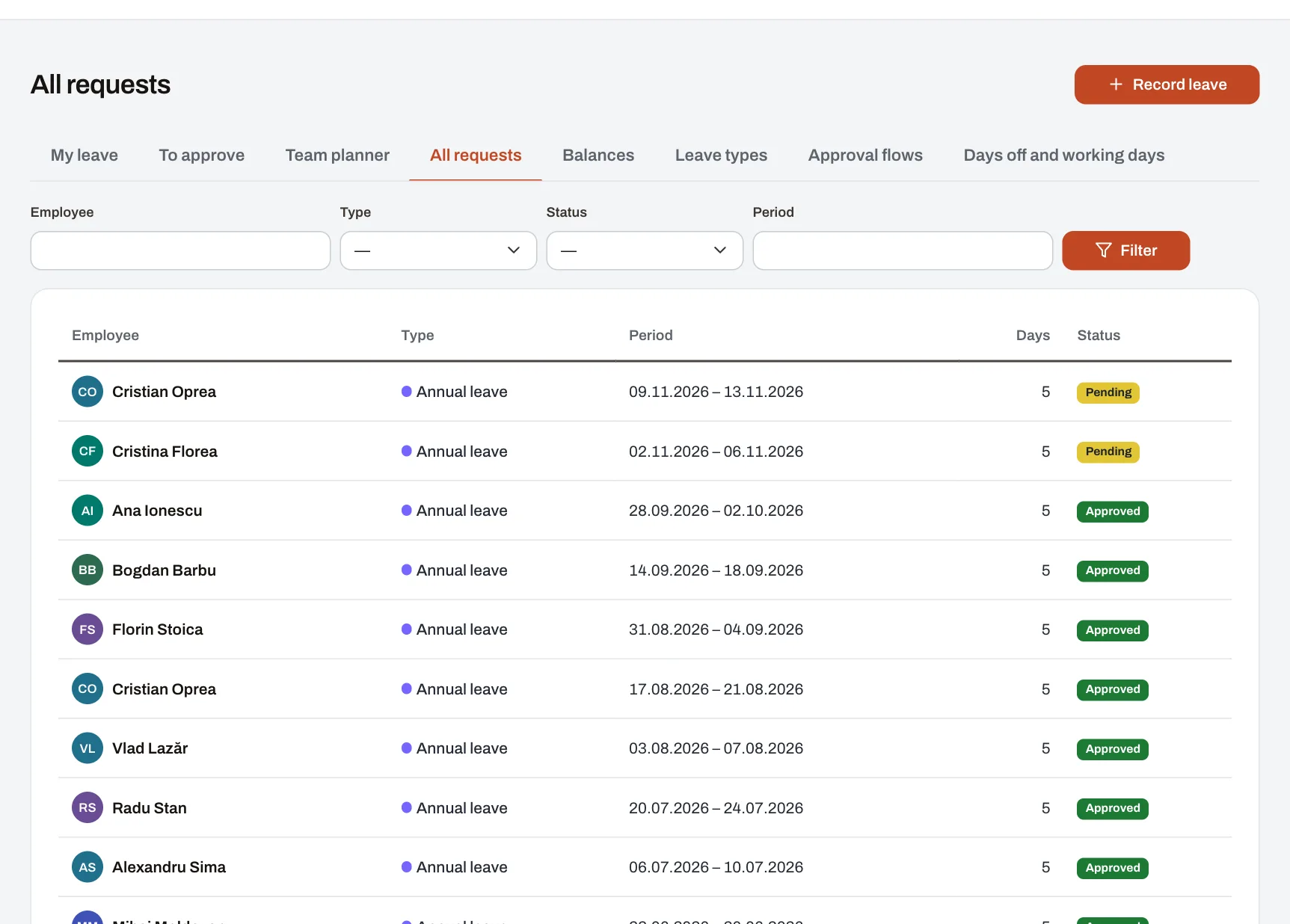
The Leave module covers a leave request from start to finish: the employee asks for the days, the request reaches whoever must approve it, the balance updates itself, and managers see in the team planner who is away each day. For types counted in working days, the days are counted without weekends, Romanian public holidays or the days off your company gives. It is meant for companies that want to stop keeping leave in spreadsheets and approving it by email, however many locations they have.
How it works
- The employee makes the request. They pick the leave type and the dates and see, before sending, how many days the request takes and, for annual leave, how many days they have left. If the type asks for them, they add the document, its series and number, or a replacement among their colleagues. The result: the request shows as “pending” for them and for those who approve it. Harmoniq won’t accept a request that overlaps other leave, exceeds the days available or goes over the type’s maximum.
- Whoever approves gets a notification. Each step of the flow is approved by the person’s manager, a role (HR, for example) or one named person. The result: the request shows under Approvals.
- The approver decides from the list. They approve or reject, giving a reason when rejecting. On a step, the first approver to answer decides; a rejection ends the request, an approval sends it to the next step. The result: at the end, the person gets the answer.
- The balance updates. Approved days show as taken. Pending days are already taken off what is available, so they can’t be requested twice.
- The leave shows in the calendar and the team planner. A manager sees the whole month for the people in their reach, with each leave’s type; pending requests are striped. Colleagues in the same unit see only approved leave in the calendar, as “absent”.
- If plans change, the person withdraws a pending request or one that hasn’t started, and HR can cancel any active request. The result: the days go back to the balance, and whoever was to decide is told.
Sick leave takes a different path: it is recorded with the medical certificate attached and its series and number, by the person or, for them, by HR or their manager. It needs no approval, is counted in calendar days and never comes out of annual leave.
What the picture shows
The “All requests” list in the demo company, as HR sees it: for each request, the person, the leave type, the dates, the number of days and the status (pending, approved, rejected or cancelled), with filters by person, type, status and period. A manager sees the same list for the people in their reach only.
Example: a request across 30 November and 1 December
An example: an employee who works at the company all year asks for annual leave from Monday 23 November to Friday 4 December 2026. The company has set no extra days off in that period.
| What is counted | Days |
|---|---|
| Days in the period | 12 |
| Weekend (28–29 November) | −2 |
| Public holidays: St Andrew’s Day (Monday 30 November) and National Day (Tuesday 1 December) | −2 |
| Leave days in the request | 8 |
If she had 20 days of entitlement for 2026 and 3 days carried over from 2025, and has taken no other annual leave this year, 15 days are left after the request; the 3 carried-over days are used first. Had the company declared Wednesday 2 December a day off before the request, it would have taken 7 days.
The leave types you start with
Every company gets these types, with defaults based on Romanian law. Each can be changed, switched off or joined by types of your own.
| Type | Counted in | From the yearly balance | Most per request | Approval |
|---|---|---|---|---|
| Annual leave | working days | yes, 20 days a year | — | yes |
| Sick leave | calendar days | no | — | no, recorded with the certificate |
| Unpaid leave | working days | no | — | yes |
| Own marriage | working days | no | 5 days | yes, with a document |
| A child’s marriage | working days | no | 2 days | yes, with a document |
| Birth of a child | working days | no | 5 days | yes, with a document |
| Paternity leave | working days | no | 15 days | yes, with a document |
| Death of spouse, child, parent or parent-in-law | working days | no | 3 days | yes, with a document |
| Death of grandparent or sibling | working days | no | 1 day | yes, with a document |
| Blood donation | working days | no | 1 day | yes, with a document |
| Time off in lieu | working days | no | — | yes |
For each type the company chooses: how days are counted, whether they come out of the yearly balance and how many days a year it gives, how long carried-over days stay valid, the most per request, whether it is paid, whether it asks for a document, a series and number or a replacement, and the approval flow. The defaults are a starting point: match them to your contracts and internal rules.
Balances
- Entitlement is pro-rata for the part of the year the person is employed, from their hire date and, where there is one, their leaving date, rounded to whole days.
- Days left over from a year move into the next year’s balance, once, and are used first. The balance shows until when they are valid.
- An adjustment adds or takes away days, for example extra days in a contract. HR can change, for each person and year, the entitlement, the carried-over days and their expiry date.
- Days taken and pending aren’t kept by hand: they are added up from the requests every time, so the balance can’t fall behind.
Limits and conditions
- Plan: Leave is included in every plan, the free plan too, and so is the Calendar, where the team planner lives. Excel exports come from Reports, with the “Export reports to Excel” permission; requests and balances are also available through the API on Enterprise.
- Permissions: “Request absences” (all employees by default), “Approve absences” (managers by default) and “Configure absence types and balances” (HR by default), which also covers the company’s days off and the approval flows. Everyone sees and decides only for the people in their reach.
- What to set up first: employees linked to their accounts, with their hire date; units and who manages whom, so Harmoniq knows where each request goes; days carried over from the years before Harmoniq, entered under Balances; the company’s own days off.
- Whole days: leave is requested in days; there are no hours or half days. Leave from the yearly balance that runs from one year into the next takes two requests, one for each year.
- The calendar of days: public holidays are Romania’s, worked out for each year (Easter and Pentecost included). Days off and worked days set by the company apply to the whole company. Days are counted when the request is sent; a day off added later doesn’t change requests already made.
- Harmoniq keeps the leave records; it doesn’t calculate pay or allowances, keep timesheets or send data to REGES.
Frequently asked questions
Do colleagues see why someone is away?
No. Colleagues in the same unit only see in the calendar that the person is absent, and only once it is approved. The type of leave — sick leave, for example — is seen only by the person, those who approve their requests and HR.
Who approves when the manager is away?
The manager can appoint a deputy for a period; if the deputy holds the approval permission, they decide the requests of the people in the reach they take over, but never those of the manager they stand in for. On a “person’s manager” step, HR gets the request only when the person has no manager who approves.
How do we add bridge days off and worked Saturdays?
Under Days off and working days, HR adds a day off or a working day, with a name. From then on new requests take it into account, and the day shows in everyone’s calendar.
What happens to leave days not taken?
They move into the next year’s balance and are used first. Whatever is left of them doesn’t carry over another year. HR can correct the carried-over days and their expiry date at any time.
Can we have our own leave types and several approval steps?
Yes. Add types with their own rules, and approval flows of up to six steps, for example the manager first, then HR. A type without a flow is recorded at once, with no approval.
Read next
- Guide: leave tracking without spreadsheets
- Calendar and events: holidays, leave and company events
- People and organisation: units, managers and deputies
- Mobile and notifications: requests and approvals from anywhere
- Company API: requests and balances in other systems
- Pricing and what each plan includes
- Try the demo company