

 Română
 English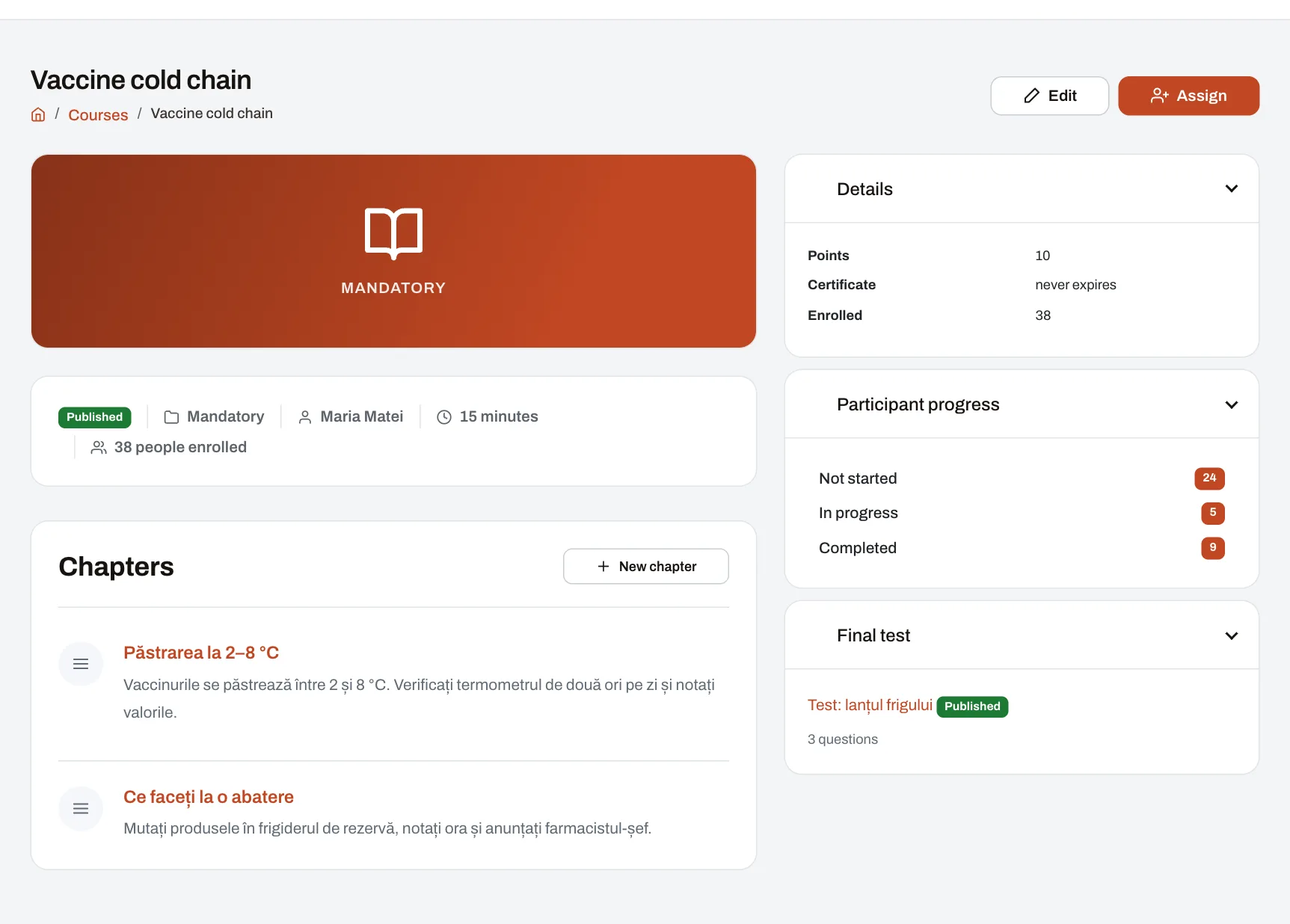
The training module lets HR write courses in chapters and tests, lets managers assign them to the people in their reach with a deadline, and lets every employee take them on a computer or a phone. The outcome stays visible: who finished, with what score, who is late, plus a company certificate with a code anyone can verify. It is meant for internal training (procedures, products, systems, ways of working); the official health and safety training record is kept separately, as explained under “Limits and conditions”.
From course to proof, step by step
- HR (the “Manage courses” right) creates the course: chapters with text, files (PDF, Office documents, images, MP4 video) and videos from YouTube or Vimeo; the estimated duration, the category, whether it issues a certificate and how long that stays valid. Result: the published course can be assigned.
- The test author (the “Author tests” right) adds the course’s final test or a standalone test: single-choice, multiple-choice, true/false or free-text questions; the pass mark (70% by default, changeable for the company and for each test), a time limit, the number of attempts, shuffled order or a number of questions drawn for each attempt. Result: the published test; once anyone has made an attempt, its questions can no longer be changed.
- A manager or HR (the “Assign courses” right) assigns a course or a test: to people, units, departments or areas; to a position or the whole company only with company-wide access. They choose the date it becomes available, the deadline and, if needed, “Also enroll people who join later”. Result: everyone enrolled is notified, and new colleagues who match are enrolled automatically while the assignment is open.
- The employee opens “My learning” and works through the chapters in order: the next one opens once the current one is finished. Then they take the test. Result: progress shows as a percentage; two days before the deadline they get a reminder if they have not finished.
- The test is marked: choice questions at once, free-text answers by a grader (the “Grade tests” right). A choice question scores only when exactly the correct options are ticked. Result: the score as a percentage and “Completed” or “Not passed”; if attempts remain, the employee can take the test again.
- On passing (or on the last chapter, when there is no test), the course is completed. Result: the certificate, if the course issues one, with a number and a verification code, plus points and badges if the company uses them.
- The manager follows the assignment: for each person in their reach they see the status, chapters done, attempts, score and deadline. They can extend the deadline, grant an extra attempt or excuse someone who has not started. Result: the list can be downloaded as an Excel file.
What the picture shows
A course page as HR sees it: the cover, the status (published), the category, the author, the estimated duration and how many people are enrolled; the list of chapters; on the right, the points, the certificate (here with no expiry), participant progress (not started, in progress, completed) and the final test with its number of questions. The buttons at the top edit or assign this course.
A marking example
An example test has 8 choice questions worth 1 point each and one free-text question worth 2 points: 10 points in total. The pass mark is 70%.
| Moment | What happens | Status |
|---|---|---|
| The employee submits the test | 6 choice questions right = 6 points; the free-text answer waits for the grader | Awaiting grading |
| The grader gives 1.5 points out of 2 | 7.5 out of 10 points = 75%, above the pass mark | Completed, with a certificate |
| Alternative: the grader gives 0.5 points | 6.5 out of 10 points = 65%, below the pass mark | Not passed on this attempt; can retake if attempts remain |
On a question with several correct answers, ticking every option does not earn the point: only the exact combination counts.
What you can export
- An assignment’s list, in Excel: employee number, name, status, progress, score, attempts, deadline and completion date, for the people in the downloader’s reach.
- The “Courses and tests” and “Certificates” reports, in Excel: enrolments with deadline, status, lateness, score and pass; certificates with number, issue date and validity. They can be requested at once or scheduled weekly or monthly, and each recipient gets only the people in their own reach. They need the “Export reports to Excel” and “Assign courses” rights.
- The certificate, as a PDF, downloaded by its holder or by anyone who has them in reach.
Limits and conditions
- Plan: training is included in Professional and Enterprise. On Starter it can be added as a separate module from the Subscription page; not on the Free plan. See pricing and what each plan includes.
- Rights: by default, the Owner and the HR admin create courses and tests, grade and assign; area and unit managers assign and follow only the people in their reach. The company can change each role’s rights.
- Accounts: courses and tests are taken only with a Harmoniq account, and every active account takes a seat in the plan.
- Who is enrolled: an assignment follows each person’s current primary placement (unit, department, area, position), so it depends on a company structure kept up to date.
- Video: YouTube or Vimeo links only, or uploaded MP4 files.
- The certificate is issued by your company and shows that the person finished the internal course. It is not an officially recognised qualification.
- Health and safety training: a course with a test can support a health and safety training session, but it does not replace the individual training record that health and safety law requires to be filled in and signed. Harmoniq has no electronic signature. Health and safety training and medical checks are recorded in the Health and safety module, where the signed document can be attached.
Frequently asked questions
Does a new employee get the mandatory courses automatically?
Yes, if the assignment has “Also enroll people who join later” ticked and its deadline has not passed. The check runs every hour: anyone who arrives in the targeted unit, department or position is enrolled and notified.
What happens when a certificate expires?
If the course has a validity period and recertification set, the course is assigned to the holder again a month before expiry, due on the expiry date. On the verification page, an expired certificate shows as expired.
How does someone outside the company check a certificate?
A verification code is printed on the certificate. The code’s public page, with no account needed, shows the holder, the course, the issuing company, the number, the issue date and whether it is still valid.
What if someone fails the test?
They take it again if the test still allows attempts; the best score is kept. Once attempts run out, the enrolment shows “Not passed”, and the manager can grant an extra attempt.
Can Harmoniq serve as the record for a health and safety inspection?
For the health and safety training record, use the Health and safety module, where you attach the signed record. Courses and tests add, with a date and a score, what each person went through and what they knew.
Further reading
The guide Training records, ready for an inspection offers a “who, which training, when, with what proof” matrix and a checklist for inspection day. The share of training completed on time can also feed performance scores. You can see a course with sample data in the demo company.