

 Română
 English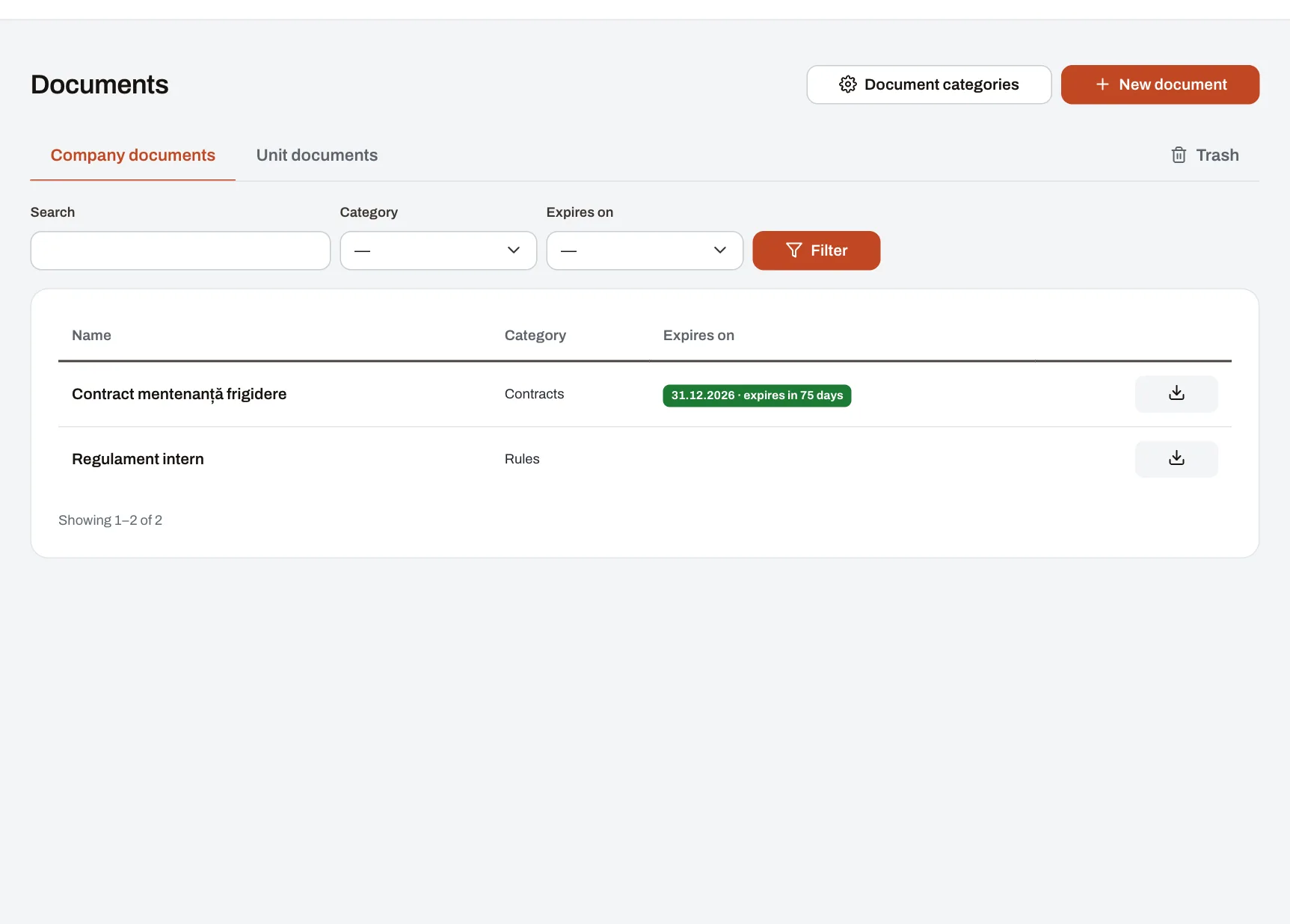
Documents and requests keeps the dated paperwork of your company and its units — permits, contracts, insurance policies, rules — in one place, together with the requests that come in from the units: a repair, a problem to sort out, consumables. Whoever is responsible for a document is told before it expires, and every request reaches the people who handle it and is followed to the end, with its history. The module is made for companies with several units, where head office and unit managers need the same record.
Documents: from upload to renewal
- Whoever manages the company’s documents (or a manager, for the units in their reach) uploads the file and gives it a name, a category and, if it has one, an expiry date. The document appears under “Company documents” or “Unit documents”.
- They choose when the alerts come: by default 30 and 7 days before and on the expiry date, or up to six thresholds of their own, between 0 and 365 days. They also choose who gets them: particular people, the unit’s managers or, if nobody is chosen, the person who created the document.
- For an obligation that comes back — a yearly inspection, a service contract — they fill in “Repeats every” a number of months: once the date has passed, it moves on to the next one by itself.
- Every morning Harmoniq checks the dates and sends each alert once, in the app, on the phone and by email, as each recipient has chosen. A day the check did not run is caught up the next day.
- On renewal, a new version is uploaded with a note and the date is changed; the alerts start again for the new date. Older versions and the history of changes stay with the document.
On the dashboard, people responsible for the whole company see how many documents have expired and how many expire within the next 30 days.
Who sees a document
- Company documents: everyone with an account, except those marked “Internal”, which only the people who manage company documents see.
- A unit’s documents: the people who currently work in the unit and the managers who have it in their reach; internal ones only the people who manage the unit’s documents.
- Everyone downloads the current version; earlier versions, the history and the alerts sent are seen only by those who manage the document.
- A deleted document goes to the trash, from where it can be restored or deleted permanently.
Files are kept privately, separately for each company, and have no public address: they open only after Harmoniq checks the person’s right to them. Someone without access to a document does not find it in the list or through search.
Service requests
- An employee picks the unit (their own or, for a manager, one in their reach) and a category set by the company, such as repairs or IT, describes the problem and attaches up to 8 photos or PDF files.
- If that category has an approval flow, the request waits for approval, step by step: the manager, a role or a named person. Without a flow, it opens straight away.
- The open request reaches the people who handle that category; if you have named nobody, those with company-wide approval rights. One of them takes it on and it moves to “In progress”.
- Everything is discussed in the request’s thread: comments and status changes, each with its author and time. Whoever did not make the change is told.
- At the end the request is “Resolved” or “Unresolved”, with the reason. If the problem is still there, the requester reopens it, again with a reason; until it is taken on, they can also cancel it.
Material requests
- An employee picks materials and quantities for their unit from the company’s catalogue (with a picture and a unit of measure) and sends the request.
- The request reaches the people named for those materials or, if there are none, those who manage materials. One of them takes it on; material requests do not go through an approval flow.
- On completion, the quantities are taken out of stock. If there is not enough stock, the request cannot be completed until a receipt or a correction is recorded.
- Stock is never typed in by hand: every receipt, delivery and correction stays as a stock movement, with the person who made it. For materials whose stock is not tracked, the request is completed without reducing anything.
What the picture shows
The “Company documents” list of a demo company as someone in HR sees it: each document with its category and expiry date, coloured by how much time is left (“expires in 12 days”, “expired yesterday”), with filters by category and expiry. The “Unit documents” tab shows the same for each unit.
Archiving, approval, signature
| What Harmoniq does | What it does not do | |
|---|---|---|
| Keeping a document | Keeps the file, its versions, its expiry date and its alerts; who sees it depends on the unit and the “Internal” mark. | It does not ask for or record confirmation that someone has read or accepted it. |
| Approving a request | Records each step’s decision, who took it and when, with a reason required for a rejection. | It does not stand in for a signature on a document. |
| Electronic signature | — | Harmoniq does not sign documents. Anything that must be signed is signed outside the app, and the signed copy is uploaded as a new version. |
If you want people to confirm they have read a new rule, use a post with a read confirmation; procedures written as text belong in the knowledge base.
Limits and conditions
- Plan: the module is included in Professional and Enterprise. On Starter it can be added separately as an extra module; it is not available on the free plan. Details on the pricing page.
- Permissions: “Manage company documents”, “Manage work unit documents” (unit and area managers have it by default, for their reach), “Submit requests” (every employee, by default), “Approve requests” (managers, by default) and “Manage materials and stock”. Each role’s permissions can be changed.
- What you set up: document categories, service categories with who handles them and their approval flow (up to six steps, the same flows as for leave), the materials catalogue and stock receipts.
- Files: a document can be up to 50 MB (PDF, Word, Excel, PowerPoint, OpenDocument, text, CSV, images or ZIP); a photo attached to a request up to 15 MB. Files count towards your plan’s storage; when it is full, new uploads are refused and nothing already stored is touched.
- Company and unit documents only: the module does not keep a personal file for each employee. Each person’s health and safety training and checks are recorded in the health and safety module, included in the same package.
- Connections: documents, service requests and material requests can be exported to Excel by people with the right to reports; in Enterprise they are also available through the API. If you also use Performance, the share of dated documents still valid can feed the units’ scorecards.
Frequently asked questions
Who gets the expiry alert if I choose nobody?
The person who created the document. For a unit’s documents you can also tick “Also alert the unit’s managers”, and the alert goes to the managers who have the unit in their reach.
Can I sign documents in Harmoniq?
No. Harmoniq keeps documents, watches their dates and records the approval of requests, but it has no electronic signature. A document signed elsewhere is uploaded as a new version of the existing one.
What happens to the stock if a material request is cancelled?
Nothing: stock goes down only when a request is completed. A cancelled request, whether new or taken on, moves no quantity.
Can a manager approve their own request?
No. Nobody decides on their own request. While a manager is away, a deputy named for a period can decide for their people, but not on the manager’s own requests.
Do my colleagues see the requests I send?
A unit’s service requests are seen by the people who work in it, those who handle them and the managers in whose reach it is. A material request is seen only by the requester, those who handle those materials, managers with approval rights for the unit and those who manage materials.
Alerts and requests also reach the phone as notifications — see how notifications work. You can try the module in the demo company or read how files are protected on the security page.