

 Română
 English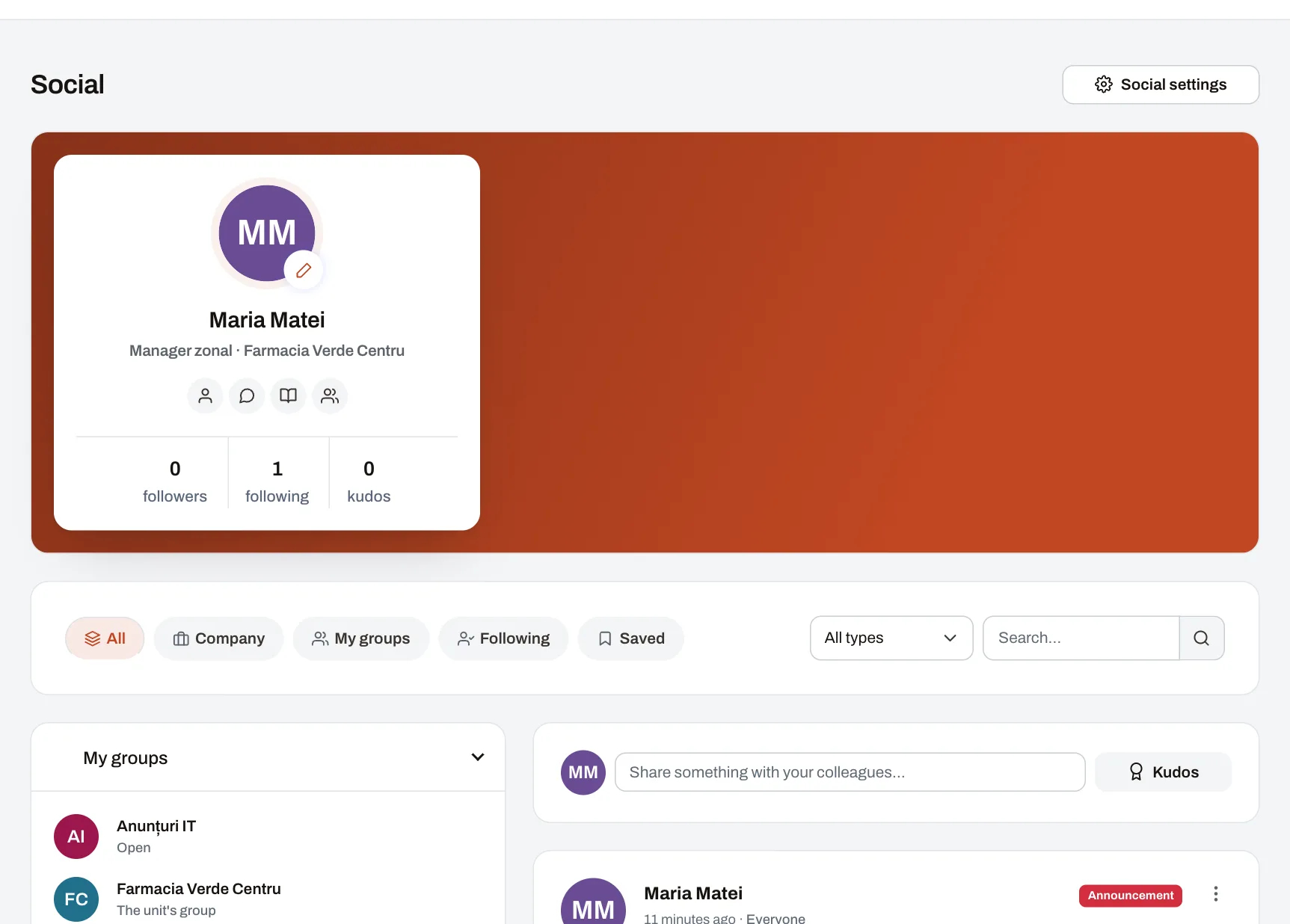
The company’s social network (the Social module) is where management, HR and managers publish announcements for the people they concern, and where colleagues post, comment and talk in groups. It is made for companies with several units or locations, where part of the staff does not work at a desk: on a computer or a phone, everyone sees what was published for the whole company, for their unit, department, area, position or role, and in the groups they belong to. An important announcement can ask for a read confirmation, and the author sees by name who has confirmed and who has not.
What to use for each message
| Situation | What to use | Who can publish it | Who is notified |
|---|---|---|---|
| A new rule or procedure people must know | Announcement with a read confirmation | Whoever holds the right to publish announcements | The whole chosen audience; reminders for those who have not confirmed |
| Information for a unit, an area or the whole company | Announcement, news, promotion or contest | Whoever holds the right to publish announcements | For the “Announcement” type, the whole chosen audience; the other types appear in the feed without a notification |
| A question, a photo, an idea for colleagues | A post in the feed | Anyone with an account, to the whole company or to their own unit, department or area | Nobody separately; colleagues @mentioned are notified |
| A team’s or a project’s everyday conversation | A group, with topic discussions | The group’s members | Members who chose to hear about the group’s posts |
| A matter between two people or within a small group | A direct message | Anyone, where the plan and the company allow it | Only the participants |
| A procedure people must still find a year from now | A knowledge base article, announced in the feed | Whoever manages the knowledge base | The article’s audience, if the author chooses to announce it |
How to send an announcement with a read confirmation
- The author (HR, a manager or anyone else with the right to publish announcements) writes the announcement, attaches up to 20 images or files and chooses the audience: the whole company, units, areas or departments; positions and roles can be chosen only by someone with company-wide access. They tick “Ask readers to confirm they read it” and may schedule the post for later. Result: the announcement appears in the audience’s feed at the chosen time.
- Every colleague in the audience with an active account is notified: in the app’s bell and, unless they changed their settings, by email, plus a browser notification on the devices where they allowed it. Result: the announcement shows an “I have read and understood” button in their feed.
- The colleague reads it and presses the button. Result: who confirmed, and on which date and at what time, is recorded.
- The author (or a moderator) opens “Confirmations”. Result: two lists by name, “Confirmed” (with the date) and “Not yet”, which can be exported as CSV.
- The author sends a reminder to those who have not confirmed, at most once a day. Result: only the people still missing are notified.
On the Professional and Enterprise plans, the author also sees the post’s insights: how many people are in its audience, how many saw it, reactions, comments, confirmations and how views grew over the first two weeks.
What the picture shows
An area manager’s Social page: at the top, their profile card with followers and kudos; below it, the feed’s filters (All, Company, My groups, Following, Saved), the post-type choice and search. On the left are their groups, including their unit’s automatic group; on the right, the box for writing to colleagues, the “Kudos” button and an announcement published for everyone.
What a read confirmation proves, and what it does not
- It proves that a given person in the announcement’s audience pressed “I have read and understood” on a given date and at a given time. The list can be exported and kept.
- It does not prove that the person understood the content or applies it. Where understanding matters, add a short course with a test.
- It is not a signature. For documents the law requires to be signed, keep your company’s signing procedure.
- “Seen”, in the insights, means the post appeared on the person’s screen, not that they read it.
- If you change the text after some people have confirmed, their confirmations stay. For a change of substance, publish a new announcement with a confirmation.
On the phone
No app-store download is needed: Harmoniq opens in the phone’s browser and can be added to the home screen. Each person chooses, for each kind of notification, how it reaches them: by email at once or in a daily summary, as a browser notification, or by SMS if the company has connected its SMS account. Details on the Mobile and notifications page.
Limits and conditions
- Plan: Social is included in every plan, Free included. Post insights and direct messages are on Professional and Enterprise. See pricing and what each plan includes.
- Rights: anyone with an account posts, comments and reacts. Announcements (news, announcements, promotions, contests) and read confirmations need the “Publish announcements” right, which the Owner, HR admin, area managers and unit managers hold by default; the company can give it to or take it from any role. Pinning posts and handling reports are for moderators.
- Audience: a manager publishes to their own units, departments and areas and to those they manage. The audience is worked out from people’s current placements, so it depends on a company structure kept up to date.
- Accounts: announcements reach only colleagues who have a Harmoniq account, and every active account takes a seat in the plan. Colleagues without an account do not appear in the confirmation list either.
- SMS: only through the company’s own smslink.ro account, paid by the company, and only for people who choose that channel.
- Not an emergency channel: notifications depend on each person’s settings and connection. For anything that needs a reaction within minutes, use the phone.
- Moderation: any post or comment can be reported; moderators decide (and group admins, for what is in a group), and who reported it is never shown.
Frequently asked questions
Can colleagues who don’t work at a computer read the announcements?
Yes, if they have an account: they open Harmoniq in their phone’s browser and get browser notifications or an email. Anyone who doesn’t want notifications throughout the day can choose a single daily summary email.
Can an employee write to the whole company?
Yes, a regular post, which appears in the feed without sending notifications. Announcements, news, promotions, contests and read confirmations are only for people with the right to publish announcements.
What about a colleague who joins after the announcement was published?
Once placed in the unit, they see the announcements published for it, older ones included, and join the unit’s group automatically. If the announcement asks for a confirmation, they appear under “Not yet” and receive the next reminder.
Can we see who read an announcement that has no confirmation?
Not by name. Insights (Professional and Enterprise) show how many people saw the post. A list by name exists only for announcements that ask for a confirmation.
What else is in Social?
Each has its own page: groups and discussions, direct messages, kudos and celebrations, polls, events and confirmations.
Further reading
The guide Internal communication beyond chat groups offers a “which message goes on which channel” rule, an announcement template and a 30-day transition plan. You can see the feed with sample data in the demo company.